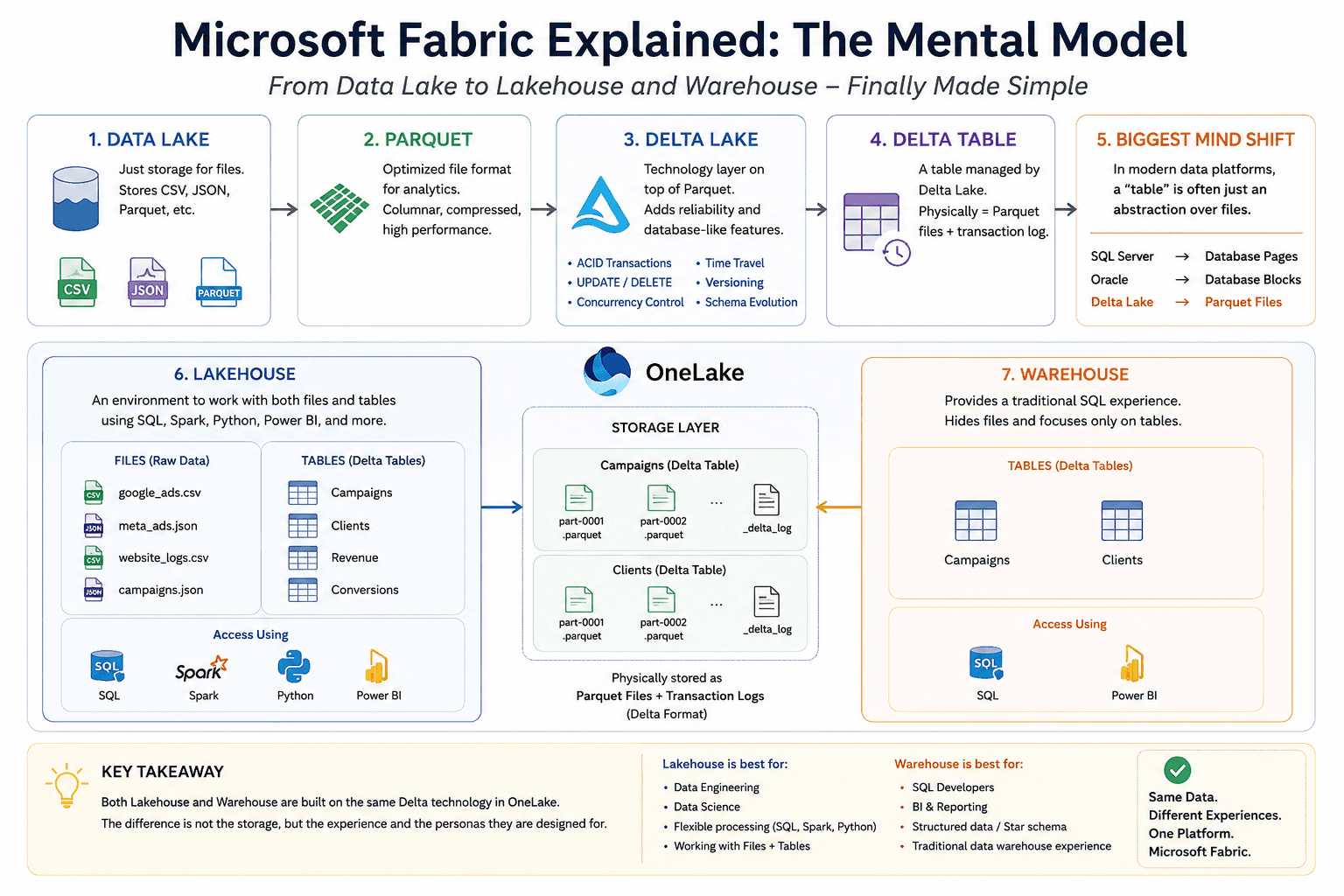
As a Senior Business Analyst with years of experience in SQL Server and Power BI, I recently started preparing for the Microsoft Fabric DP-600 certification.
Like many professionals coming from a traditional database background, I quickly found myself overwhelmed by new terminology:
Data Lake
Parquet
Delta Lake
Delta Table
Lakehouse
Warehouse
OneLake
The more videos and articles I watched, the more confused I became.
Eventually, I stopped trying to memorize the terminology and instead tried to understand the underlying concepts. Once I did that, everything started to make sense.
This article summarizes the mental model that finally worked for me.
Step 1: A Data Lake Is Just Storage
The first realization was that a data lake is simply a storage system.It stores files such as:
CSV
JSON
Parquet
For example:OneLake | +-- sales.csv +-- customers.json +-- orders.parquetA data lake doesn’t understand concepts like:
tables
transactions
primary keys
foreign keys
updates
It simply stores files.
Step 2: What Is Parquet?
Parquet is an optimized file format for analytics.Unlike CSV files, Parquet stores data in a columnar format, making it much faster for analytical workloads.For example:sales.parquet customers.parquet orders.parquetParquet files can exist independently inside a data lake.However, Parquet has some limitations:
No ACID transactions
No UPDATE or DELETE support
No versioning
No rollback capability
No transaction management
Step 3: Delta Lake Solves the Problems of Parquet
This was the biggest “aha” moment for me.Delta Lake is not another storage system.Instead, Delta Lake is a technology layer that adds database-like features on top of Parquet files.In simple terms:Delta Lake = Parquet Files + Transaction LogDelta Lake provides:
ACID transactions
UPDATE and DELETE operations
Time travel
Versioning
Concurrency control
Schema evolution
Step 4: What Is a Delta Table?
Initially, I thought Delta Lake and Delta Table were the same thing.They’re not.Think about SQL Server:SQL Server | +-- Customer Table +-- Orders TableSimilarly:Delta Lake | +-- Customer Delta Table +-- Orders Delta TableA Delta Table is simply a collection of:parquet files + _delta_logFor example:Campaigns | +-- part-0001.parquet +-- part-0002.parquet +-- _delta_log
Step 5: The Biggest Mind Shift
Coming from SQL Server, I always thought:
Tables store data.
What I learned is that in modern data platforms:
Tables are often just abstractions.
This realization changed everything for me.
Step 6: What Is a Lakehouse?
A Lakehouse is an environment that allows you to work with:
files
Delta tables
using multiple tools:
SQL
Spark
Python
Power BI
For example:MarketingLakehouse | +-- Files | +-- google_ads.csv | +-- meta_ads.json | +-- Tables +-- Campaigns +-- ClientsThe key point is:
A Lakehouse exposes both files and tables.
Step 7: What Is a Warehouse?
This concept confused me the most because both Lakehouse and Warehouse support SQL.The difference isn’t about storage.The difference is about user experience.A Warehouse hides all file concepts and provides a traditional SQL experience.For example:MarketingWarehouse | +-- Campaigns +-- ClientsUnder the hood, Fabric still stores data using Delta technology.The Warehouse simply hides the implementation details.
The Mental Model That Finally Worked for Me
OneLake | +-- Lakehouse | | | +-- Files | +-- Delta Tables | +-- Warehouse | +-- Delta TablesWhere:Delta Table = Parquet Files + Transaction Log
My Biggest Takeaway
As someone coming from SQL Server and Power BI, the biggest realization was this:
In modern data platforms, a table is no longer necessarily a physical database object.
Instead:
A table can simply be an abstraction over files.
Once I understood this, concepts like:
Delta Lake
Lakehouse
Warehouse
OneLake
Microsoft Fabric
became much easier to understand.If you’re coming from a traditional SQL or BI background and struggling with Fabric terminology, I hope this mental model helps you as much as it helped me.